Block 600 and 809 Spam Calls on Android and Samsung

Do you have an Android or Samsung phone and can’t stop receiving calls from 600 and 809 numbers? This guide explains how to block them automatically and for free using ChaoSPAM, without having to reject each number one by one.
The problem with native Android and Samsung call blocking
Android phones, including Samsung Galaxy devices, let you block individual numbers. The typical process is:
- Open the call history
- Long-press the number
- Select “Block number”
The problem is obvious: each blocked number is just one of the thousands in the 600 or 809 range. Call centers constantly rotate their numbers, so this approach is ineffective against mass spam.
Samsung also has a “Block mode” and filtering options in the Phone app, but neither allows you to block entire number prefixes in a targeted way.
ChaoSPAM: automatic 600 and 809 prefix blocking on Android
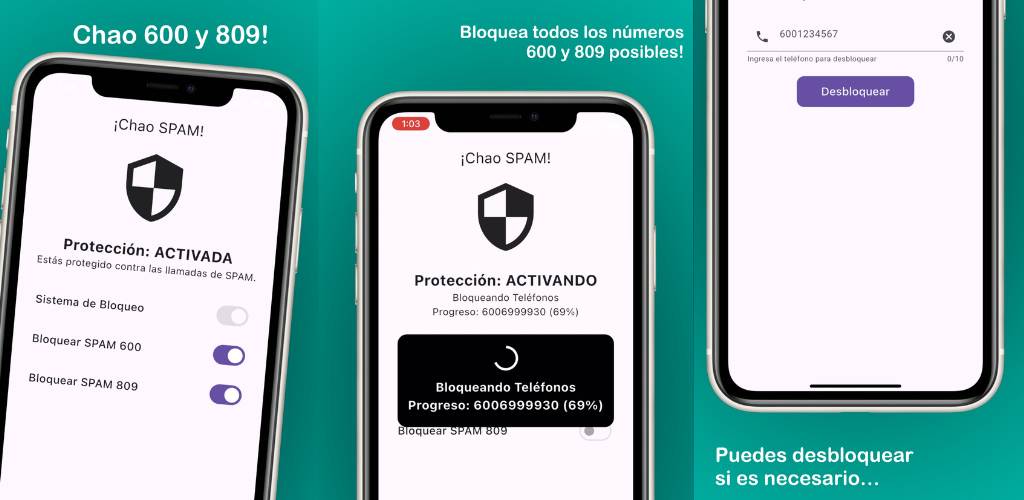
ChaoSPAM is a free app available on Google Play that automatically blocks calls from the 600 and 809 prefixes and other common spam patterns in Chile. No manual setup needed — no list of blocked numbers to maintain.
Key advantages:
- Full prefix blocking: 600, 809 and variants
- No subscription, completely free
- Full privacy: your data and contacts never leave your device
- Runs in the background without affecting performance

How to install and set up ChaoSPAM on Android
Step 1: Download ChaoSPAM from Google Play
Search for “ChaoSPAM” in the Google Play Store or use the button above. The download is free.
Step 2: Open the app and enable blocking
When you open ChaoSPAM, you’ll find toggles to enable blocking for 600 and 809 calls. Turn them on.
Step 3: Grant the required permissions
Android will ask for permissions so ChaoSPAM can manage incoming calls. Accept them for the blocking to work correctly.
That’s it. From that point on, calls from 600 and 809 numbers are blocked automatically before your phone even rings.
Does it work on all Android and Samsung devices?
ChaoSPAM is compatible with Android 10 or higher, which covers the vast majority of Samsung Galaxy phones (S, A, and M series) as well as devices from other manufacturers like Motorola, Xiaomi, LG, and others.
What if I need to receive a specific 600 call?
If there’s a particular 600 number you need to receive calls from (your bank, for example), you can add it as an exception in the app or directly from your contacts list. ChaoSPAM never blocks numbers saved in your address book.
Conclusion
Blocking 600 and 809 calls on Android and Samsung doesn’t have to be a never-ending manual process. With ChaoSPAM, you set it up once and forget about it. Download it free on Google Play and start enjoying an interruption-free phone.
You might also like
How to Block a Phone Number in Chile: Step-by-Step Guide
Learn how to block a phone number in Chile on iPhone and Android. Native methods and ChaoSPAM for automatic spam call blocking.
April 23, 2026
How to Block a Number on Movistar Chile: Step-by-Step Guide
Learn how to block a number on Movistar Chile from iPhone and Android. Device methods and ChaoSPAM for automatic spam blocking.
April 23, 2026
How to Block a Number on WOM Chile: Complete Guide
Learn how to block a number on WOM Chile from iPhone and Android. Device options and ChaoSPAM for automatic spam blocking.
April 23, 2026