Phone Spam in Chile: Your Rights and How to Block It Free

Phone spam is one of Chile’s most reported consumer complaints. SERNAC (Chile’s National Consumer Service) constantly receives complaints about unsolicited calls from telecom companies, debt collectors, and telemarketing firms. This article explains what rights you have — and, more importantly, how to block 600 and 809 spam calls right now, for free.
What does SERNAC say about spam calls?
SERNAC protects consumers from abusive commercial practices, including phone harassment. Under Chile’s Consumer Protection Act (Law 19.496), companies cannot contact you for commercial purposes without your explicit consent.
Key consumer rights:
- Right not to be contacted: If you’ve said you don’t want commercial calls, the company must respect that.
- Right to revoke consent: If you previously agreed to receive communications and no longer want them, you can withdraw that consent.
- Right to file a complaint: You can submit a claim at SERNAC.gob.cl if a company violates these rules.
The practical limits of filing a SERNAC complaint
Filing a complaint is an important right, but it has real-world limitations:
- It’s slow: Mediation and enforcement processes can take weeks or months.
- It doesn’t stop the calls immediately: While your complaint is being processed, your phone keeps ringing.
- Hard to identify the responsible party: Many spam calls come from external call centers acting on behalf of multiple companies at once.
A SERNAC complaint is valuable for long-term accountability and protecting other consumers, but if you want to silence spam today, you need a technological solution.
How to block 600 spam calls for free with ChaoSPAM
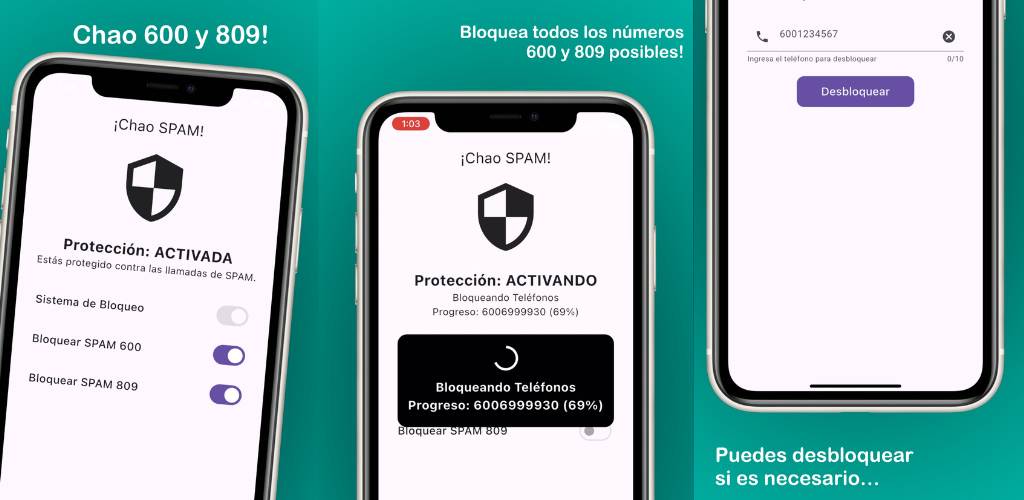
ChaoSPAM is the immediate solution to phone spam in Chile. It’s a free app for iPhone and Android that automatically blocks calls from 600, 809 and other common telemarketing prefixes in the country.
Unlike a SERNAC complaint, ChaoSPAM acts instantly — the spam call never reaches your phone.
Key features
- Automatic blocking of 600 and 809: No manual lists, no complex configuration
- Full privacy: Your data never leaves your device
- 100% free: No subscriptions or payments
- Works on iPhone and Android: One app for both platforms
How to install it
On iPhone:
- Download ChaoSPAM from the App Store
- Open the app and enable protection
- Go to Settings > Phone > Call Blocking & Identification and enable ChaoSPAM
- Enable 600 and 809 blocking from within the app
On Android:
- Download ChaoSPAM from Google Play
- Open the app and toggle the blocking switches on
- Accept the required permissions


The complete strategy against phone spam
For the best result, combine both approaches:
| Action | Effect | Timeline |
|---|---|---|
| Install ChaoSPAM | Immediate blocking of 600 and 809 | Immediate |
| Ask the company to stop calling | Legal obligation to cease contact | 1–2 weeks |
| File a SERNAC complaint if calls continue | Company sanction | Weeks/months |
Conclusion
You have rights against phone spam, and SERNAC is a valid tool for exercising them. But while the legal process plays out, ChaoSPAM protects you immediately and for free. They’re not mutually exclusive — use both and take back control of your phone.
You might also like
How to Block a Number on Movistar Chile: Step-by-Step Guide
Learn how to block a number on Movistar Chile from iPhone and Android. Device methods and ChaoSPAM for automatic spam blocking.
April 23, 2026
How to Block a Number on WOM Chile: Complete Guide
Learn how to block a number on WOM Chile from iPhone and Android. Device options and ChaoSPAM for automatic spam blocking.
April 23, 2026
How to Block a Number on Entel: Complete Guide for Chile
Learn how to block a number on Entel from your iPhone or Android. Device settings and ChaoSPAM for automatic spam blocking.
April 23, 2026