How to Block Spam Call Prefixes Permanently



If you’ve already identified which numbers keep disrupting your day — as we explained in our guide on identifying spam call prefixes — it’s time to take action.
The problem is that Android and iOS don’t let you easily create a rule that says “block everything starting with 600.” Block one number today and tomorrow they’ll call from a slightly different one.
The drawbacks of blocking numbers manually
- Wastes your time: You have to open your call log, find the number and add it to your blocklist after every annoying call.
- The list never ends: Call centers rotate their numbers. Blocking a specific number is pointless because next time they’ll use a different combination while keeping the same spam prefix.
- You’re still harassed first: Your phone rings every time anyway. The interruption already happened.
The definitive solution for blocking spam call prefixes
To solve the problem at the root, you need to block the “root” of the number. That’s where ChaoSPAM comes in — technology built specifically for this purpose.
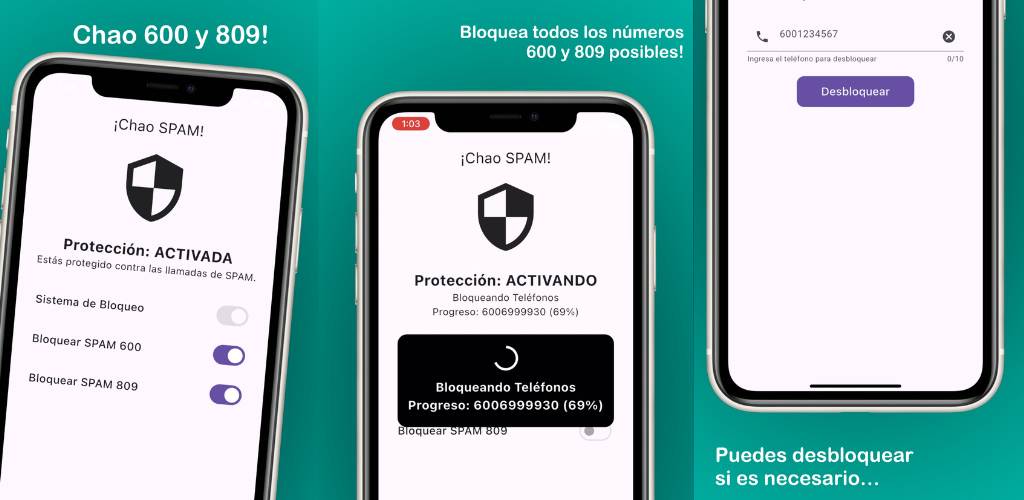
Instead of building an endless individual list, ChaoSPAM uses intelligent filters designed for Chilean networks. Created by ELCSoftware, it comes with ready-to-use filters that automatically reject any call from the country’s most problematic prefixes, including 600 and 809.
Why ChaoSPAM works better
- Native technology: Integrates with Apple’s
CallKitand Android’s call filtering API. This means the call is blocked before your phone even rings. - Privacy guaranteed: ChaoSPAM doesn’t need to read your contacts. It works through blocklists provided by the app itself that match millions of spam prefix variations.
- Country-specific filters: Tailored to Chilean call center tactics (plan upgrades, debt collection, aggressive telemarketing).
- 100% free: No trial periods, hidden charges, or invasive ads.
Step by step: install ChaoSPAM in 2 minutes
On iPhone
- Open the App Store and search for “ChaoSPAM”.
- Download and install the app (free, no ads).
- Go to Settings → Phone → Call Blocking & Identification.
- Enable the toggle next to ChaoSPAM.
- Open ChaoSPAM and activate the prefixes you want to block (600, 809, etc.).
From that moment, calls from those prefixes are rejected before your phone makes a sound.
On Android
- Open Google Play and search for “ChaoSPAM”.
- Download and install the app.
- Open ChaoSPAM and grant the call filtering permission when prompted.
- Enable the desired prefix filters from the main screen.
Which prefixes does ChaoSPAM block?
The main prefixes covered in Chile:
- 600 — Telemarketing, debt collection, and mass sales calls
- 809 — Robocalls and active number verification systems
Frequently asked questions
Do I need to update the blocklists manually? No. ChaoSPAM updates its filters automatically with each new app version available in the store.
Does it work with Entel, WOM, Movistar and Claro? Yes. ChaoSPAM operates at the phone’s OS level, independently of your carrier.
Can I disable a filter if I need to receive a 600 call? Yes. You can temporarily disable a filter from the app with a single tap and re-enable it whenever you want.
Protect your phone right now
No technical knowledge is needed. Just install the app from your phone’s official store and toggle on the spam prefixes you want to silence.
Leave the hassle behind. Your time and peace of mind are worth it. To learn more about your consumer rights against phone harassment, check out our article on Chile’s Consumer Law and SERNAC.
You might also like
How to Block a Number on Movistar Chile: Step-by-Step Guide
Learn how to block a number on Movistar Chile from iPhone and Android. Device methods and ChaoSPAM for automatic spam blocking.
April 23, 2026
How to Block a Number on WOM Chile: Complete Guide
Learn how to block a number on WOM Chile from iPhone and Android. Device options and ChaoSPAM for automatic spam blocking.
April 23, 2026
How to Block a Number on Entel: Complete Guide for Chile
Learn how to block a number on Entel from your iPhone or Android. Device settings and ChaoSPAM for automatic spam blocking.
April 23, 2026