Silence Unknown Numbers and Spam Calls in Chile



Getting calls from unknown numbers in the middle of a work meeting or while you’re resting isn’t just annoying — it’s also a potential privacy threat. How to block spam calls is one of the most common questions we receive from users in Chile. Below are the most effective methods to stop phone harassment.
Why you receive so many spam calls
The market for phone data is enormous. When number databases circulate, you become a target for plan upgrades, insurance offers, or worse — scams. Knowing how to identify spam call prefixes (like 600 and 809) is your first line of defense.
But most of the time, we hand over our own information. When you make a purchase, register for a service, or enter a contest, the fine print often authorizes sharing your data with third parties.
Different methods for blocking spam calls
There are several strategies for dealing with spam overload, depending on your patience and your device.
1. “Do Not Disturb” as a temporary fix Both iPhone and Android let you configure “Silence Unknown Callers” or enable “Do Not Disturb” mode.
- Pros: Stops noise from numbers not in your contacts.
- Cons: You could miss important legitimate calls (delivery services, doctors, your child’s school).
2. Built-in blocklists
- Pros: You can block a number after confirming it was spam.
- Cons: As discussed in how to block spam definitively, companies simply call from a different number.
3. Going through official channels: SERNAC Chile has the SERNAC platform for consumer protection complaints. Find out about the legal process to stop spam through SERNAC.
- Pros: Legally obliges the company to stop contacting you.
- Cons: It’s a process that doesn’t take effect immediately — it can take weeks.
4. The complete solution: ChaoSPAM
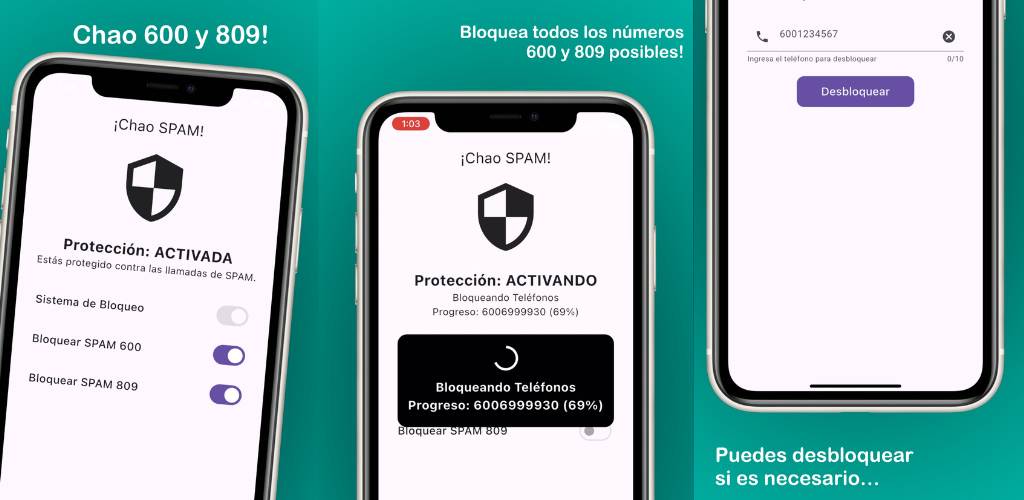
If you really want to know how to block spam calls on autopilot — starting today — ChaoSPAM is your best option. 100% free, no sign-up required.
ChaoSPAM understands that Android and iOS can’t natively filter by prefix (like all numbers starting with 600). So it feeds updated prefix blocklists directly to the operating system.
- You won’t miss genuinely important calls.
- You stay fully in control: turn filters on and off whenever you want.
- All activity stays on your device — nothing is sent over the internet.
How to enable “Silence Unknown Callers” on iPhone and Android
If you want to try your phone’s built-in feature before installing ChaoSPAM:
On iPhone (iOS 13 or later):
- Open the Settings app.
- Scroll down and tap Phone.
- Enable Silence Unknown Callers.
From that point on, calls from numbers not in your contacts will go straight to voicemail. Keep in mind you could miss important notices from doctors, banks, or delivery services.
On Android (varies by manufacturer):
- Open the Phone app.
- Tap the menu (three dots or gear icon).
- Look for Block Numbers or Call Settings.
- Enable Block calls from unknown numbers or Filter spam.
This feature doesn’t distinguish between real spam (600/809 prefix) and legitimate calls from unknown numbers, so it can generate false positives.
Frequently asked questions
Can ChaoSPAM and “Silence Unknown Callers” be used together? Yes, they’re compatible. But with ChaoSPAM active you won’t need “Silence Unknown Callers” — the app distinguishes real spam from legitimate unknown calls.
Does ChaoSPAM drain battery or use extra data? Not significantly. It operates at OS level without processing audio, so its impact on battery and data is minimal.
What if the spam company changes its number? ChaoSPAM blocks by prefix (600, 809), not individual number. If the company calls from 600 123 4568 or 600 987 6543, both are blocked automatically.
Download ChaoSPAM and solve your problem immediately:
You might also like
How to Block a Number on Movistar Chile: Step-by-Step Guide
Learn how to block a number on Movistar Chile from iPhone and Android. Device methods and ChaoSPAM for automatic spam blocking.
April 23, 2026
How to Block a Number on WOM Chile: Complete Guide
Learn how to block a number on WOM Chile from iPhone and Android. Device options and ChaoSPAM for automatic spam blocking.
April 23, 2026
How to Block a Number on Entel: Complete Guide for Chile
Learn how to block a number on Entel from your iPhone or Android. Device settings and ChaoSPAM for automatic spam blocking.
April 23, 2026