How to Block a Number on Entel: Complete Guide for Chile



If you’re an Entel customer in Chile receiving spam calls, unsolicited collections, or simply want to block a specific number, you have several options available. This guide explains each method step by step—from operating system settings to specialized apps.
What Options Does Entel Have for Blocking Numbers?
Entel, as a telecommunications carrier in Chile, does not offer individual number blocking as a standard service for residential mobile customers. Blocking specific numbers is handled at the device level.
The main options are:
- Phone blocking (iPhone or Android): the most direct and immediate method
- ChaoSPAM: for automatic blocking of spam and commercial prefixes
- Contact Entel for harassment or fraud cases: in serious situations, the carrier can intervene at the network level
How to Block a Number on Entel from iPhone
If you have an iPhone with an Entel line, blocking is done directly in iOS:
From the Call History
- Open the Phone app
- Go to Recents
- Tap the ⓘ icon next to the number you want to block
- Scroll down to Block this Caller
- Confirm by tapping Block Contact
From Contacts
If the number is saved as a contact:
- Open the Contacts app or find the name in Phone
- Tap the contact name
- Scroll down to Block this Contact
- Confirm
View and Manage Blocked List on iPhone
- Settings > Phone > Blocked Contacts
- Here you can see all blocked numbers and unblock any by swiping left
How to Block a Number on Entel from Android
For Entel customers with Android:
- Open the Phone app
- Tap the recent call from the number to block
- Select Block number or Add to block list (name varies by manufacturer)
- Confirm
On Samsung devices with Entel, the path may be:
- Phone > Recents > long press the number > Block/Reject calls
To manage the blocked list on Android:
- Phone > More options (⋮) > Settings > Blocked numbers
When to Contact Entel Directly
Device-level blocking is sufficient for most cases. However, some situations warrant contacting the carrier:
- Systematic phone harassment: if you receive threatening or harassing calls from the same number repeatedly, Entel can log the complaint and, in extreme cases, coordinate with authorities.
- Fraud or phishing: if you suspect a number is being used to commit fraud using Entel’s name, report it to Entel and the relevant authorities.
- Fraudulent international calls generating charges: if you notice unauthorized charges on your account linked to calls, contact Entel immediately.
To contact Entel:
- From your Entel phone: dial 103
- From another phone: 600 360 0 103
- Web: entel.cl > Customer Service
Blocking 600, 800 and 809 Spam Prefixes on Entel
The most common problem for Entel customers (and any carrier customer) isn’t blocking a specific person—it’s the constant flow of telemarketing and collection calls that constantly change numbers.
Blocking one by one doesn’t work when the call center has hundreds of available numbers. The most effective solution is prefix-level blocking.
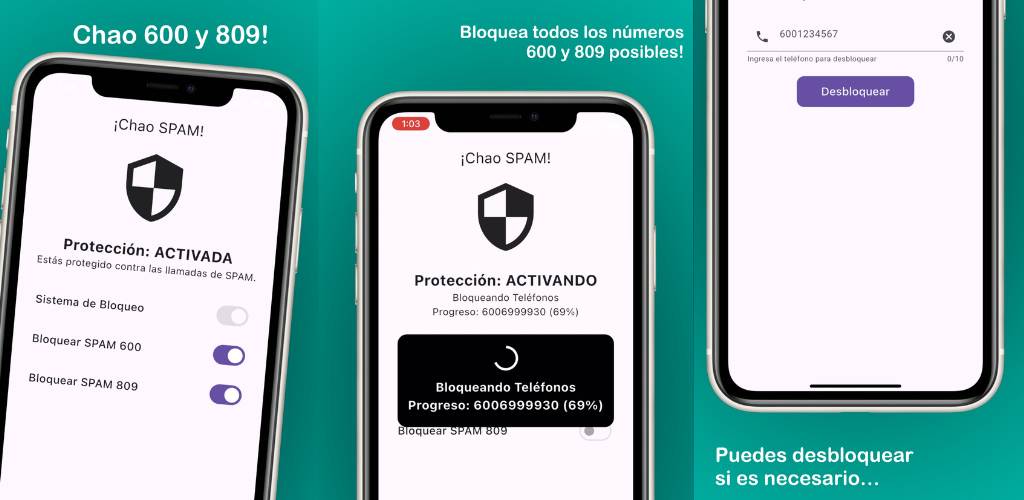
ChaoSPAM is a free app compatible with any carrier in Chile, including Entel. It works at the operating system level (not the carrier’s network) to automatically block:
- Calls from all numbers with the 600 prefix
- Calls from all numbers with the 800 prefix
- Calls from all numbers with the 809 prefix
- Other common spam patterns in Chile
Once installed and configured, it runs in the background without significant battery consumption. Your phone doesn’t ring when a blocked call comes in, regardless of how many different numbers the call center uses.
Tips for Entel Customers Receiving Spam
- Save Entel’s support number (103) in your contacts: so you don’t confuse it with spam if they call from a different number for plan management.
- Be suspicious of calls claiming to be from Entel from unknown numbers: Entel may contact you from various numbers, but should never ask for passwords, card details, or verification codes by phone.
- Activate voicemail: the way to not miss a legitimate call even when silencing unknown callers or blocking unknowns.
- Check your plan regularly in the Entel app: to stay informed about renewals and changes without depending on calls.
- Use ChaoSPAM alongside native blocking: ChaoSPAM covers commercial prefixes automatically; native iOS/Android blocking covers specific individual numbers.
Frequently Asked Questions
Can I ask Entel to block a number at the network level? For residential customers on standard mobile plans, Entel doesn’t offer individual number blocking at the network level as a standard service. Blocking is done at the device level. For serious harassment cases, Entel can coordinate special measures through their emergency response area.
Does ChaoSPAM work with my Entel SIM? Yes. ChaoSPAM works at the phone’s operating system level, not the SIM. It works with any Chilean carrier: Entel, WOM, Movistar, Claro, VTR Mobile, or others.
Does blocking a number on my iPhone with Entel also block SMS? Yes. Blocking in iOS affects both calls and SMS from the blocked number.
If I block a number, does that person know they’re blocked? No. The caller receives no notification that they are blocked.
Can Entel give me information about who called from an unknown number? No. Caller identification data is confidential. Entel cannot reveal which person or company a number belongs to upon customer request.
How many numbers can I block on my phone with an Entel line? There is no limit imposed by Entel. The limit is set by your phone’s operating system, which in practice has no relevant cap for normal use.
Silence Spam, Not Important Calls
With the right tools, being an Entel customer doesn’t mean tolerating phone spam. Combine individual blocking through the operating system with ChaoSPAM for an effective defense against the commercial prefixes that bother most people in Chile.
You might also like
Block Spam Calls from Chilean Carriers on iPhone and Android
Block 600 and 809 spam calls from Entel, WOM, Movistar, Claro and other Chilean carriers on iPhone and Android, for free with ChaoSPAM.
March 5, 2026
How to Block a Number on Movistar Chile: Step-by-Step Guide
Learn how to block a number on Movistar Chile from iPhone and Android. Device methods and ChaoSPAM for automatic spam blocking.
April 23, 2026
How to Block a Number on WOM Chile: Complete Guide
Learn how to block a number on WOM Chile from iPhone and Android. Device options and ChaoSPAM for automatic spam blocking.
April 23, 2026