How to Block a Number on Movistar Chile: Step-by-Step Guide



If you use Movistar in Chile and you’re tired of phone spam, collections, or commercial calls you didn’t ask for, this guide explains all available options for blocking numbers effectively.
What Options Exist to Block Numbers on Movistar Chile?
Like other carriers in Chile, Movistar doesn’t offer a standard personalized blacklist service for specific numbers on residential mobile plans. Incoming call control is primarily managed from the device.
However, you have available:
- Native iOS and Android tools for individual blocking
- ChaoSPAM for automatic prefix-based spam blocking
- Movistar customer service for harassment or fraud situations
Block a Number on Movistar from iPhone
The process is identical to any carrier because it happens in iOS, not on Movistar’s network:
From Recent Calls
- Open the Phone app
- Go to the Recents tab
- Tap the ⓘ icon next to the number
- Scroll down to Block this Caller
- Confirm with Block Contact
The number is completely silenced: it cannot call you, send SMS, or contact you via FaceTime.
From a Saved Contact
If the number is in your contacts:
- Open Contacts
- Find and tap the contact
- Scroll to the bottom and tap Block this Contact
- Confirm
Review Your Blocked List
- Settings > Phone > Blocked Contacts
- Here you can add numbers manually and remove any you no longer want to block
Block a Number on Movistar from Android
The process depends on your device manufacturer. General steps:
- Open the Phone or Dialer app
- Go to Recents and tap the call to block
- Select Block or Reject calls from this number
- Confirm
On Samsung with Movistar: Phone > Recents > long press the number > Block/Reject calls
On Xiaomi: Phone > Recents > long press > Block
On Huawei: Phone > Recents > tap the number > More > Block contact
Blocked numbers management: Phone > Settings (⋮) > Blocked numbers
Movistar and Phone Spam: The Real Problem
Movistar customers in Chile receive the same type of spam as everyone else: call centers for insurance, card offers, collections, surveys. These don’t come from Movistar (though sometimes they may be Movistar’s own campaigns): most are external companies that have your number from some database.
The typical pattern is that spam comes from 600, 800, or 809 prefixes, constantly rotating among different numbers within the same range. Blocking each number individually is inefficient against this volume.
Solution for Mass Spam with Movistar Line: ChaoSPAM
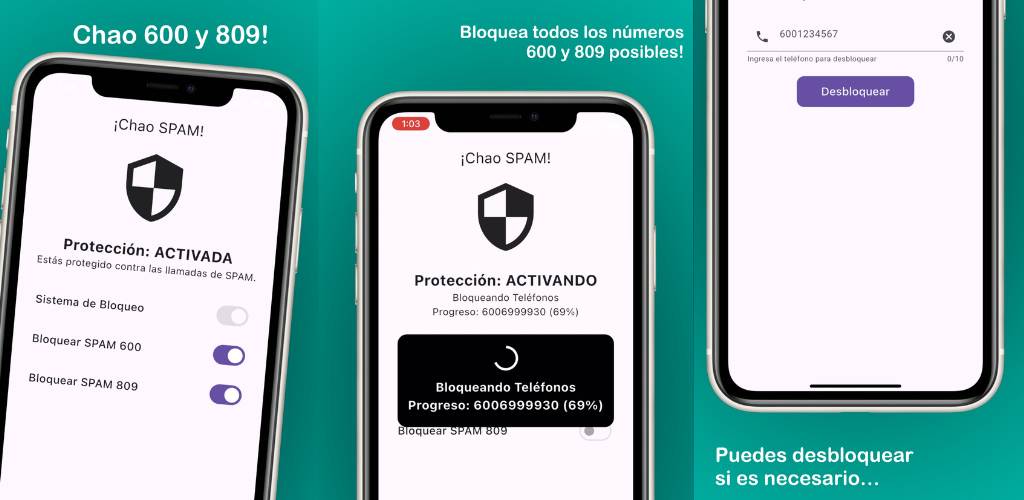
ChaoSPAM is the most effective solution for high-volume spam. Compatible with any Chilean carrier including Movistar:
- Automatically blocks all 600s, all 800s, and all 809s
- No manual management required: once activated, it operates on its own
- Works in the background with no impact on battery or performance
- Completely free for iPhone and Android
- Your data remains on your device: ChaoSPAM doesn’t upload contacts to external servers
The difference from manual blocking is fundamental: instead of chasing each new number, you block the entire pattern at once.
Special Cases with Movistar Chile
If You Receive Commercial Calls from Movistar Itself
Movistar may call you from their own numbers to offer plan upgrades, additional services, or billing information. If you don’t want these calls:
- Call 600 600 0123 (Movistar support)
- Request to be excluded from marketing campaigns
You can also manage this through the Mi Movistar app or movistar.cl website.
If You Suspect Fraud in Movistar’s Name
If you receive a call where someone claims to be from Movistar and asks for passwords, card numbers, or verification codes:
- Don’t provide any data
- Hang up and call 600 600 0123 to verify if the communication was legitimate
- Report the fraud attempt
For Systematic Phone Harassment
For cases of repeated harassment with documentation (times, frequency), Movistar can assist at the network level in extreme cases. Contact customer service with available evidence.
How to Contact Movistar:
- From Movistar mobile: 105
- From another phone: 600 600 0123
- App: Mi Movistar
Comparison Table of Blocking Methods for Movistar
| Method | Effort | Covers | Limitation |
|---|---|---|---|
| Individual blocking (iOS/Android) | Per number | Specific number | Call centers rotate numbers |
| Silence unknown callers | One setting | All unknowns | Also blocks legitimate calls |
| ChaoSPAM | One setting | 600, 800, 809 prefixes and more | Doesn’t cover mobile spam numbers |
| Contact Movistar | Support management | Documented harassment cases | Only extreme cases |
Tips for Movistar Customers Who Want Less Spam
- Save known Movistar numbers: the support number (105 from Movistar) and any number you’ve received legitimate communications from.
- Don’t respond to suspicious SMS: phishing via SMS is just as common as by call. Don’t click links or respond to SMS from unknown numbers claiming to be Movistar.
- Use ChaoSPAM for prefix spam: the most efficient way to reduce the volume of interruptions without affecting your ability to receive real calls.
- Activate Mi Movistar app notifications: to receive account information via app instead of by call, reducing the need for Movistar to call you for account notices.
Frequently Asked Questions
Does ChaoSPAM work the same on Movistar as on other carriers? Yes. ChaoSPAM operates at the operating system level (iOS or Android), not the carrier network. It works exactly the same with Movistar, Entel, WOM, Claro, or others.
Can I accidentally block Movistar’s support number? If you block 105 or 600 600 0123, you won’t receive Movistar communications. We recommend saving those numbers in your contacts before activating general blocks or silencing unknown callers.
Does number blocking work with Movistar prepaid? Yes. Device-level blocking doesn’t depend on plan type. It works equally with prepaid and postpaid.
Does Movistar offer any network-integrated caller ID service? Movistar doesn’t offer an advanced caller ID service as standard for residential customers in Chile beyond what the standard network transmits. Additional identification of spam numbers is delegated to device apps.
If I block a number with Movistar, does it affect my bill? No. Blocking incoming calls generates no charges and doesn’t affect your plan.
Can I set automatic time-based blocking on Movistar? Not directly with Movistar. However, on iPhone you can use “Do Not Disturb” mode to silence all calls during specific hours. ChaoSPAM operates continuously without time restrictions.
Fewer Interruptions, Same Connectivity
Being a Movistar customer doesn’t mean accepting spam. With your phone’s native settings and ChaoSPAM to block the most frequent spam prefixes in Chile, you regain total control over who can make your phone ring.
You might also like
Block Spam Calls from Chilean Carriers on iPhone and Android
Block 600 and 809 spam calls from Entel, WOM, Movistar, Claro and other Chilean carriers on iPhone and Android, for free with ChaoSPAM.
March 5, 2026
How to Block a Number on WOM Chile: Complete Guide
Learn how to block a number on WOM Chile from iPhone and Android. Device options and ChaoSPAM for automatic spam blocking.
April 23, 2026
How to Block a Number on Entel: Complete Guide for Chile
Learn how to block a number on Entel from your iPhone or Android. Device settings and ChaoSPAM for automatic spam blocking.
April 23, 2026