How to Block a Phone Number in Chile: Step-by-Step Guide



Unwanted calls are a daily reality in Chile. Collections, telemarketing, surveys, phone fraud: they all share the same entry point—your phone number. Knowing how to block a number is a basic skill every smartphone user should master.
This guide covers all available methods: from native iPhone and Android blocking to more advanced solutions for those who receive a high volume of unwanted calls.
Method 1: Block a Number from iPhone Call History
The fastest method on iOS is directly from the recent call history:
- Open the Phone app
- Go to the Recents tab
- Tap the ⓘ icon next to the number you want to block
- Scroll down and tap Block this Caller
- Confirm by tapping Block Contact
From that moment, calls, messages, and FaceTime from that number will be silently blocked.
Managing Your Blocked List on iPhone
To view or remove blocked numbers on iOS:
- Go to Settings > Phone > Blocked Contacts
- Here you’ll see all blocked numbers
- Swipe left on any number to unblock it
Method 2: Block a Number on Android
The process varies slightly by manufacturer (Samsung, Xiaomi, Motorola, etc.), but the general flow is:
- Open the Phone or Dialer app
- Tap on the recent call from the number you want to block
- Select More options (three dots) or long-press the number
- Tap Block number or Add to block list
- Confirm the action
On some Samsung devices: Phone > Recents > number > Block/Reject calls
Managing Blocked Numbers on Android
To view your blocked list:
- Phone > More options (⋮) > Settings > Blocked numbers
The exact path depends on manufacturer and Android version.
Method 3: Silence Calls from Unknown Numbers
Both iPhone and Android offer the option to automatically silence calls from numbers not in your contacts.
On iPhone:
- Settings > Phone > Silence Unknown Callers → Enable
With this option active, calls from unknown numbers go straight to voicemail. Your phone only rings if the number is in your contacts, if you’ve called them before, or if the number recently appeared in your email or messages.
On Android: The option varies by manufacturer. Look in Phone app Settings > Filter spam calls or similar.
Important limitation: this option also blocks legitimate calls from numbers you haven’t saved—a technician, a doctor, a new work contact.
Method 4: Block Entire Prefixes with ChaoSPAM
The previous methods work for specific numbers. The problem in Chile is that phone spam doesn’t come from one number: it comes from dozens or hundreds of numbers from the same call center, all using prefixes like 600, 800, or 809.
Blocking one by one is inefficient when the call center simply moves to the next number on their list.
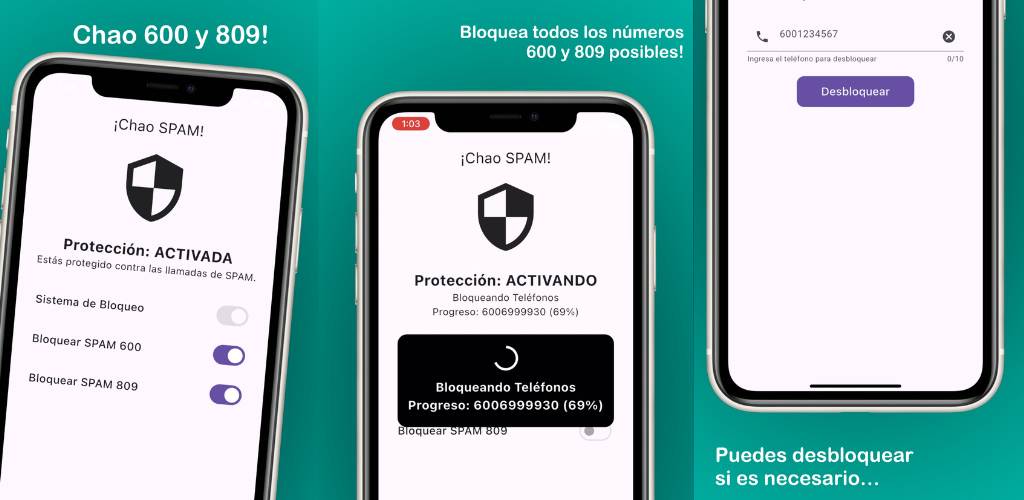
ChaoSPAM solves this with prefix-level blocking:
- Automatically blocks all numbers starting with 600, 800, 809, and other spam patterns in Chile
- No manual action required: once configured, it operates on its own in the background
- Your phone doesn’t ring, screen doesn’t light up when a blocked call comes in
- Available free for iPhone and Android
- Your data and contacts never leave your device
This is the most effective solution for those who receive multiple spam calls per day.
Comparison of Blocking Methods
| Method | Effort | Effectiveness against mass spam | Risk of blocking legitimate calls |
|---|---|---|---|
| Individual blocking (call history) | Per number | Low (they rotate numbers) | None |
| Silence unknown callers | One-time setting | High | High |
| ChaoSPAM (prefixes) | One-time setting | Very high | Very low |
When to Use Each Method
Use individual blocking when:
- A specific number calls you repeatedly (harassment, persistent wrong number)
- You want to block a specific person or company without affecting other numbers
Use silence unknown callers when:
- You’re not expecting calls from new numbers for a period
- You can regularly check voicemail to not miss important calls
Use ChaoSPAM when:
- You receive spam calls daily or several times a week
- Numbers keep changing (different 600, 800, 809 numbers)
- You don’t want to manually manage blocked lists
- You want a solution that works without ongoing attention
What Happens When You Block a Number
On iPhone, when a blocked number tries to call you:
- Your phone doesn’t ring
- The screen doesn’t light up
- The caller may hear a busy signal or be sent to voicemail
- You receive no notification of the missed call
On Android, the behavior is similar though may vary between devices.
The blocked number doesn’t know they are blocked on your phone. They only experience that the call goes unanswered or to voicemail.
Tips for More Effective Blocking
- Block promptly: as soon as you identify a spam number, blocking it quickly prevents more interruptions from that specific number.
- Combine methods: individual blocking for specific personal numbers + ChaoSPAM for mass spam from commercial prefixes.
- Don’t block without checking: before blocking an unknown number, search it on Google. It may be a legitimate notification from your bank or medical service.
- Update the app regularly: ChaoSPAM updates its spam pattern database. Keeping the app updated ensures new spam schemes are blocked.
- Use voicemail: if someone important calls and isn’t in your contacts, they’ll probably leave a message. Spam calls rarely leave coherent messages.
Frequently Asked Questions
Does blocking a number also block their text messages? Yes. On iPhone and Android, blocking a number from the call history also blocks their SMS and iMessages.
Can I block a number without the person knowing? Yes. The block is silent. The other person receives no notification that they are blocked.
How many numbers can I block on iPhone? There is no documented Apple limit for the blocked list. You can add as many numbers as you need.
Does the block carry over if I switch phones? On iPhone, if you restore from an iCloud backup, the blocked list transfers. On Android it depends on the manufacturer and whether you use Google backup. For ChaoSPAM, reinstalling the app on a new device restores full functionality.
Can I block international numbers in Chile? Yes. The process is the same. Include the country code when manually blocking, or use the international unknown caller blocking option if your operating system offers it.
Does ChaoSPAM also block numbers on WhatsApp and other messaging apps? No. ChaoSPAM operates at the level of phone calls (mobile network), not internet messaging applications. To block on WhatsApp, use the app’s built-in blocking feature.
Take Back Control of Your Phone
Blocking unwanted calls in Chile is easier than it seems. With native operating system methods and ChaoSPAM for mass spam from commercial prefixes, you can go from constant interruptions to a phone that only rings when it really matters.
You might also like
Block 600 and 809 Spam Calls on Android and Samsung
Complete guide to automatically blocking 600 and 809 spam calls on Android and Samsung for free. Stop phone spam in Chile with ChaoSPAM.
March 5, 2026
How to Block a Number on Movistar Chile: Step-by-Step Guide
Learn how to block a number on Movistar Chile from iPhone and Android. Device methods and ChaoSPAM for automatic spam blocking.
April 23, 2026
How to Block a Number on WOM Chile: Complete Guide
Learn how to block a number on WOM Chile from iPhone and Android. Device options and ChaoSPAM for automatic spam blocking.
April 23, 2026